AI FACTORY OS

Run the entire AI factory.

One operating layer across compute, fabric, storage, schedulers, facilities, deployment, telemetry, maintenance, and validation.

Open AI Factory OS demo ↗

VENDOR-NEUTRAL BY ARCHITECTURE. VENDOR-AWARE BY INTEGRATION.

From physical infrastructure to your cloud.

  1. Physical AI factoryGPUs · fabric · storage · power · cooling
  2. AI Factory OSDiscover · deploy · monitor · maintain · validate
  3. Certified capacityAcceptance evidence recorded in the Cluster Passport
  4. YANCConfigure products · identity · metering · customer access
  5. Your cloudYour brand · your domain · your customers
02 / AI FACTORY OS

Rack-level physical intelligence

Operators move from a site and hall view into a live rack elevation—connecting every sellable accelerator to its server, fabric links, power feeds, cooling state, and certification history.

  • Hall → row → rack → chassis → component topology
  • Front elevation, rear PDUs, and liquid cooling
  • Node health, service state, and configuration drift
  • One-click path from anomaly to drain and repair
SANITIZED PRODUCT VIEW · SYNTHETIC INVENTORY
AI Factory OS / Ohio Location 01 / Rack R07 LIVE
RACK ELEVATION

R07 · 48U AI rack

● HEALTHY
ACCELERATORS48 × NVIDIA H200
RACK LOAD87.4 kW
FABRIC96 / 96 UP
484032241681
NVIDIA Spectrum-X SN5600FABRIC A
Dell XE9680 · n018 × NVIDIA H200READY
Dell XE9680 · n028 × NVIDIA H200READY
Dell XE9680 · n038 × NVIDIA H200READY
Dell XE9680 · n048 × NVIDIA H200READY
Dell XE9680 · n058 × NVIDIA H200READY
Dell XE9680 · n068 × NVIDIA H200READY
Arista 7060X6-64PEMANAGEMENT
VERTIV GEIST PDU A43.8 kW208V · 3Ø · healthy
VERTIV GEIST PDU B43.6 kW208V · 3Ø · healthy
MOTIVAIR CDU142 LPM2.8 bar supply
MOTIVAIR RDHx24.1°C7.4°C delta
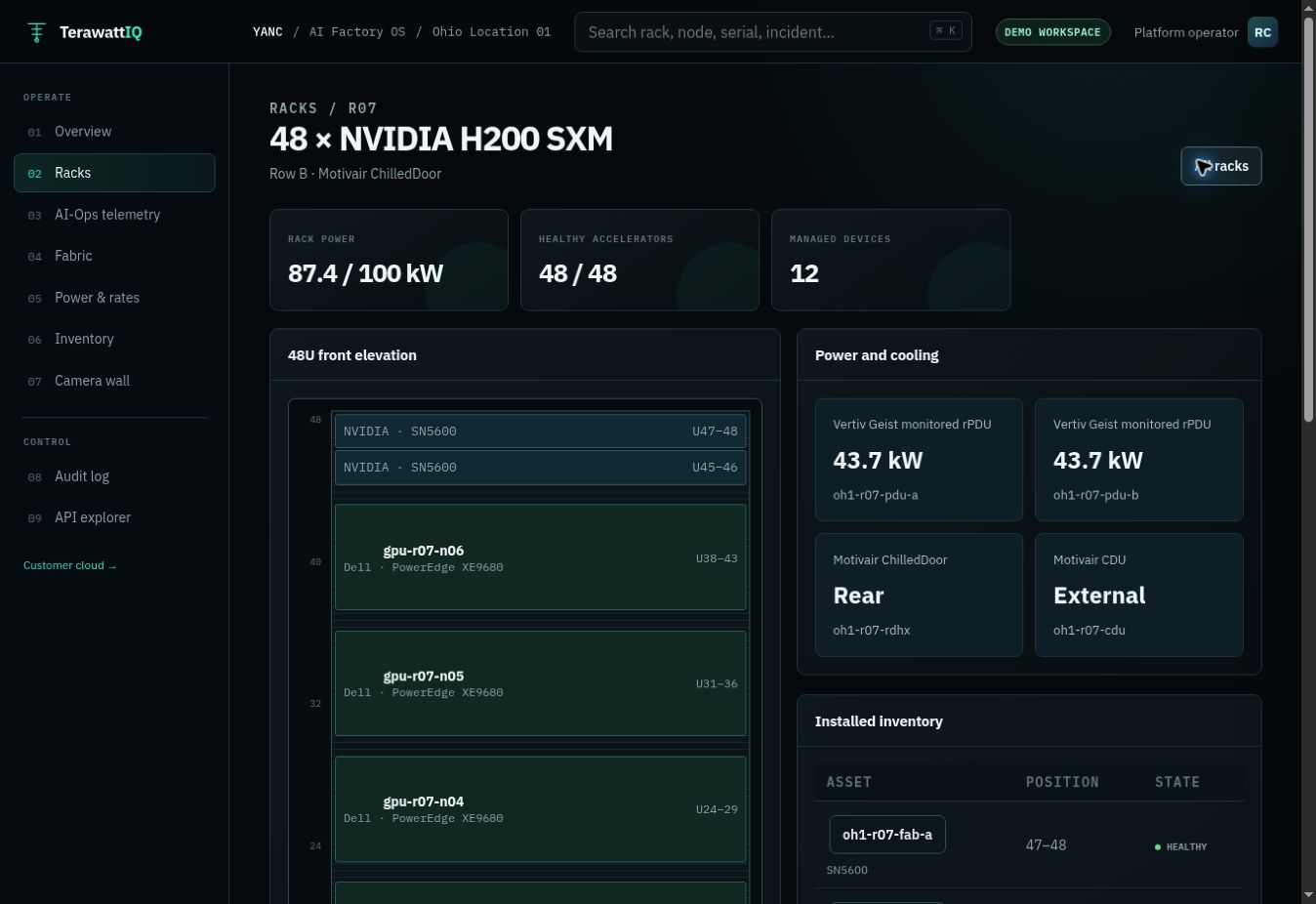
AI Factory OS rack digital twin · reference architecture and sample telemetry.

03 / AI FACTORY OS · FULL DCIM INCLUDED

Full DCIM.
Your entire AI factory, connected.

Know what you own, where it lives, what powers it, and how much capacity you can safely deploy. TerawattIQ brings data center infrastructure management into the same operating system as GPU deployment, telemetry, and maintenance.

AI Factory OS rack elevation with NVIDIA switches, Dell GPU servers, horizontal PDU power readings, and Motivair cooling equipment
Ohio Location 01 · Explore rack R07 in the interactive demo.
FROM FACILITY TO GPU

Every rack has a complete operational picture.

Follow a power or cooling issue to the affected hardware. Open its telemetry, inspect the configuration, and start the maintenance workflow from the same console.

Explore the DCIM demo
01 / INVENTORY

Sites, racks, and every asset

Facility hierarchy, rack elevations, U-space, serial numbers, GPU and NIC inventory, firmware, and asset ownership.

02 / POWER

From circuit to rack load

A/B feeds, PDUs, circuit dependencies, rack kW, utilization, and power headroom for the next deployment.

03 / COOLING

Liquid and air, together

CDUs, rear-door heat exchangers, temperatures, pressure, flow, and thermal limits alongside GPU health.

04 / CONNECTIVITY

Trace the fabric

Switches, ports, links, cabling, VLANs, trunks, and VRFs connected to the servers and tenants they serve.

05 / CAPACITY

Plan the next rack

Space, power, cooling, and compute capacity in one planning view, so available rack space is not mistaken for deployable capacity.

06 / ASSET LIFECYCLE

Keep the complete history

Warranty and spares records, incidents, maintenance, RMA coordination, configuration changes, and revalidation evidence.

Full DCIM comes with your AI Factory OS.

Day 1: establish the asset, rack, and topology baseline alongside your YANC neocloud deployment. Day 2: keep both running under one software and operations package. Device integrations and coverage are agreed for your site.

See pricing and inclusions →
04 / AI-OPS

Device telemetry down to the sensor.

Redfish, DCGM, SNMP, CAREL registers, gNMI, and standard MIBs stay visible from source to graph.

  • GPU temperatures, power, throttling, and XID errors
  • Motivair RDHx inlet, outlet, delta-T, and pressure
  • CDU flow, pressure, coolant temperature, and leaks
  • Fabric errors, congestion, BER, and port utilization
PER-SENSOR SERIES · SOURCE MAPPED
AI Factory OS / AI-Ops / Rack R07 STREAMING
DELL POWEREDGE XE9680

gpu-r07-n01 telemetry

Last 24 hours● REDFISH POLL HEALTHY
GPU SENSORS8 / 8mapped
DCGM XID0clear
NIC PORTS10 / 10streaming
REDFISH30sinterval
REDFISH · GPUSENSORS
GPU0–GPU7 die temperatures
68.4°C
8 SENSOR SERIESDIE_TEMP
DCGM_FI_DEV_XID_ERRORS
GPU error counters
0
ECC SBE 0XID 0
CAREL ANALOG · A1/A2
RDHx water temperatures
7.4°C ΔT
A1 18.4°CA2 25.8°C
CAREL ANALOG · A7/A8/A32
CDU pressure channels
37 kPa ΔP
A7 238 KPAA8 201 KPA
VERTIV GEIST · SNMP
PDU phase power
87.4 kW
L1 / L2 / L3GEIST MIB
IF-MIB · OPENCONFIG GNMI
Ethernet1–4 throughput
372 Gb/s
RX / TX SERIESERRORS 0
AI Factory OS AI-Ops · reference environment streaming GPU, switch, PDU, CDU, RDHx, scheduler, and storage signals.
05 / FABRIC STUDIO

See—and safely change—the AI fabric

A visual switch workspace turns ports, VLANs, VRFs, tenants, optics, and link health into governed infrastructure objects.

  • Per-port state, speed, optic health, errors, and owner
  • VLAN, VRF, PKey, breakout, and MTU configuration
  • Right-click actions with preview, approval, and rollback
  • Change validation against the cluster recipe
INTERACTIVE DEMO · RIGHT-CLICK A PORT
Fabric Studio / Rack R07 / sx-r07-aCONFIGURED
NVIDIA SPECTRUM-X

SN5600 · sx-r07-a

64 × 800GbE · Spectrum-4 · Cumulus Linux

● HEALTHY64 / 64 ports up
Port mapVLANsVRFsRoutingTelemetryOpen full console ↗
sx-r07-aFRONT PANEL · RIGHT-CLICK ANY PORT
SELECTED PORTswp3800G · OSFP · link up
NETWORKVLAN 2103VRF tenant-atlas
OPTICS-2.1 dBm Rx35.8°C · BER 1.2e-12
CHANGE STATEMatches recipeValidated 2m ago
AI Factory OS Fabric Studio · right-click or tap a port to inspect governed configuration actions in the reference environment.

DESIRED STATE → APPLIED STATE → VERIFIED STATE

The complete deployment lifecycle.

Deployment

DiscoveryBMC / RedfishBare-metal provisioningPXEOSBIOSFirmwareDriversGPU runtimesReproducible recipes

Storage

Filesystem integrationsParallel storageObject storageProvisioningMount workflowsThroughputLatencyCheckpoint performanceHealth + validation

Workload runtimes

Container runtimesEnroot / PyxisNVIDIA + AMDNCCL / RCCLWorkload environmentsRuntime compatibility

Validation

GPU diagnostics + burn-inPCIe / NUMANVLink / NVSwitchRDMANCCL / RCCLHPL / HPL-AIIOR / MDTestDistributed trainingCheckpoint / restartSoak + recovery

Telemetry

GPUs + CPUsMemoryNICs + switchesStoragePower + coolingFacility telemetryErrors + thermal dataWorkload stateHistorical telemetry

Fabric engineering

Ethernet / RoCE / InfiniBandSwitches + ports + opticsVLANs / VRFs / routingRDMAECN / PFC where applicableLink health + error stateValidation + performance testing

Every validation result feeds the versioned Cluster Passport.

MANAGED KUBERNETES + SLURM

Run the scheduler as part of the factory.

TerawattIQ operates the workload control plane against the same infrastructure state, topology, fabric, storage, telemetry, lifecycle, and validation system as the physical AI factory.

AI FACTORY OSMANAGED SCHEDULERSHEALTHY CAPACITYYANCCUSTOMER PRODUCT

MANAGED KUBERNETES

Operate the complete GPU platform lifecycle.

Deploy new or adopt an existing cluster, then manage control-plane health, worker lifecycle, integrations, upgrades, recovery, and post-change validation.

HA control planeetcd backup + recoveryGPU Operator + device integrationCNI + RDMA networkingPersistent storageNamespaces + RBACQuotas + tenant isolationGPU schedulingCordon + drainVersion upgradesDrift detection
CONTROL PLANE HEALTHYGPU ALLOCATABLE 512PENDING 3DRAINING 1

MANAGED SLURM

Operate scheduling, accounting, and GPU capacity.

Deploy new or adopt an existing environment, then own controller health, compute-node state, policy, upgrades, recovery, and workload-aware maintenance.

Controller lifecycle + HAslurmdbd + accountingGRES / GPU topologyPartitions + QoSAccounts + associationsReservations + quotasFair-shareEnroot / PyxisDrain + resumeStorage integrationPost-change validation
CONTROLLER HEALTHYIDLE GPUS 248PENDING JOBS 7DRAINED 1

DEPLOY NEW. TAKE OVER EXISTING.

One managed lifecycle for greenfield and brownfield.

TerawattIQ can deploy a new scheduler stack or discover, normalize, and bring an existing Kubernetes or Slurm environment under managed lifecycle control.

  1. Discover current state
  2. Identify drift + risk
  3. Establish desired state
  4. Validate infrastructure
  5. Bring under management

Workload-aware change control

NEW VERSION / CHANGECOMPATIBILITY CHECKCORDON OR DRAINAPPLY CHANGEVERIFY CONTROL PLANEVERIFY GPU + FABRIC + STORAGERE-CERTIFYRETURN CAPACITY

Kubernetes, Slurm, Linux, kernel, GPU driver, CUDA/ROCm, device plugins, container runtime, CNI, RDMA components, storage clients, firmware, and BIOS remain inside a tested compatibility envelope.

HOW THE TWO PARTS CONNECT

The complete AI factory stack, layer by layer.

AI Factory OS manages and validates the physical stack. YANC turns its available capacity into customer services through the branded portal and APIs.

L6
AI FACTORY OS ENGINE

Control, evidence, and automation

Site agents · telemetry pipeline · workflow engine · fault isolation · policy and approvals · audit log · API gateway · Cluster Passport

CONTROL PLANE
L4–L5
CLUSTER SOFTWARE

Schedulers, runtimes, and workloads

Linux kernel tuning · Slurm · Kubernetes · containerd · Enroot/Pyxis · PyTorch · vLLM · NCCL/RCCL · checkpoint hooks

SOFTWARE
L2–L3
NETWORK FABRIC

Lossless transport and isolation

Rail-optimized RoCE v2 · InfiniBand subnet management · SHARP · adaptive routing · ECN/PFC · VLANs · VRFs · PKeys · optics telemetry

FABRIC
L0–L1
PHYSICAL + FACILITIES

DCIM as a service, hardware, power, and cooling

Full DCIM as a service · asset inventory · rack elevations · capacity planning · GPU nodes · BMC/IPMI/Redfish · PXE · BIOS and firmware · PDUs · CDUs · RDHx · liquid loops · rack topology · service inventory

PHYSICAL
DISCOVERCONFIGURESTRESSMEASURESIGNCLUSTER PASSPORT

AI FACTORY OS · CONNECTED TO YANC

The control plane for the physical AI cloud.

AI Factory OS tracks physical topology, configuration, acceptance evidence, failures, and repairs. YANC uses that operational state to allocate healthy capacity to customers. Your operations team and your customers get purpose-built interfaces connected to the same infrastructure.

Declarative infrastructure recipes

Define the approved OS, BIOS, firmware, fabric, storage, scheduler, security, and benchmark state once. AI Factory OS executes it consistently from node to fleet.

Start your AI factory bring-up
OPERATOR UIYANC CLOUDAPI + CLIAI OPS
CONTROL PLANE AI Factory OS

State · workflows · policy · evidence

GPUFABRICSTORAGESLURM / K8SFACILITY
DESIGNDISCOVERPROVISIONVALIDATECERTIFYALLOCATEOPERATERE-CERTIFY

Closed-loop operations

Failure is inevitable.
Downtime does not have to be.

AI Factory OS removes unhealthy capacity from service, coordinates repair, and returns capacity only after validation passes.

01DetectTelemetry + drift
02DrainProtect workloads
03DiagnoseCorrelate evidence
04RepairRMA + smart hands
05Re-certifyProve performance
06ReturnRestore capacity

Capacity returns because it passed—not because someone closed a ticket.

AI Factory OS marks capacity healthy. YANC makes it available again.

Explore managed operations ↗

Build with confidence

Your GPUs should be generating results—not tickets.

Bring your infrastructure. TerawattIQ turns it into certified production capacity and keeps it operating.

See the platform in action